


How to Handle An Accounting Data Migration During a Financial Audit
By Hugh O. Stewart
A common question we hear from CFOs is:
“We’re halfway through our annual audit. Do we need to postpone our data migration until we get the audit adjustments?”
Fortunately, the answer is usually no. An audit shouldn’t dictate your implementation timeline.
Audit adjustments can be treated like any other source of new financial data during a migration. As long as you have a process for keeping your legacy and target systems synchronized, you can complete the migration and the audit in parallel without compromising your validation standard.
Here are some tips to ensure an audit doesn’t disrupt your migration.
Establish Your Validation Standard Before the Audit Adjustments
Every successful accounting data migration begins with a validation standard.
A validation standard is the benchmark that gives you confidence that the data in your new system is complete, accurate, usable, and matches the source of truth for your financial data. Without an agreed-upon point of comparison established before the migration begins, it’s nearly impossible to evaluate whether the migration was successful.
When a migration overlaps with a financial audit, many organizations assume they need to wait until the auditors have finalized their adjustments before establishing that benchmark. In most cases, that’s unnecessary.
Your validation standard doesn’t have to reflect the auditor’s final numbers. It simply needs to be a set of financial reports in the legacy system that your accounting team already trusts. Those pre-audit books become the baseline for validating the migration. Once you’ve confirmed that the migrated data matches that baseline, you can post the audit adjustments to both systems without undermining the integrity of the validation process.
The timeline below reflects our approach to data migration during financial audits:
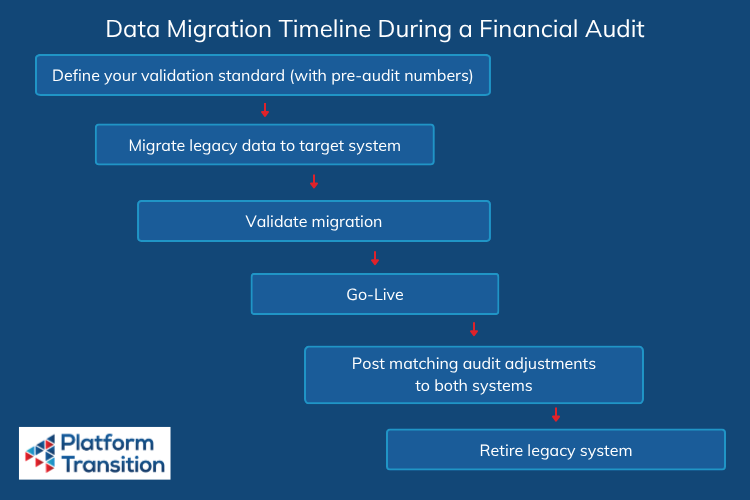
To keep your migration on track, we recommend waiting until after your Go-Live to enter audit adjustments into both the legacy and target systems.
Keep Your Financial Records in Sync During the Audit
Once you’ve validated the migration against your pre-audit books, the next objective is keeping that validation standard stable until the audit is complete.
The biggest risk during this period is unexpected divergence between your legacy system and your target system. If audit adjustments are entered into only one system, the two environments will no longer represent the same financial record.
When migrating to Sage Intacct, the solution is straightforward. Before go-live, create a dedicated Audit Adjustments journal in Sage Intacct.
This allows your finance team to begin using Sage Intacct as the system of record for day-to-day operations as soon as the implementation is complete — even if the auditor is still working. When the audit adjustments are ready to be made, post them to both the legacy system and the Audit Adjustments journal in Sage Intacct. You can configure the Audit Adjustments journal to update your financial reports, eliminating the need for rework after the audit adjustments arrive.
Retire the Legacy System When the Auditor No Longer Needs It
In many accounting system migrations, the goal is to retire the legacy system as soon as the migration is complete. During an audit, however, you may need to keep the legacy system active until the audit is complete, depending on the scope of both the migration and the audit.
If the audit period falls entirely before your Sage Intacct go-live date, the auditor will typically complete their work in the legacy system. In that case, the simplest approach is to leave the legacy system accessible until the audit is finished, then retire it once the audited financial statements have been finalized.
If the audit spans both the pre-cutover and post-cutover periods, the auditor will need to work in both systems, unless your migration scope includes your subledger (and in some cases, your sub-subledgers). A subledger migration can recreate the invoices, payments, adjustments, attachments, and other supporting objects for every transaction inside Sage Intacct, making it possible to trace any transaction from the financial statements to the underlying source documents without leaving Sage Intacct. Thus, audit-readiness can be one of the many benefits of a subledger migration, depending on the comfort of the auditor being engaged.
Complete Your Audit and Your Data Migration in Parallel
An audit and an accounting software implementation can proceed in parallel with the right preparation and approach to data migration. The key is to establish a validation standard using your pre-audit numbers, and keep that standard stable until the audit is complete.
Platform Transition has helped hundreds of organizations with thousands of entities migrate historical accounting data into Sage Intacct while navigating complex business requirements, including ongoing financial audits. If you’re planning a migration and want to keep your implementation on schedule without compromising audit readiness, request a quote or schedule a meeting with our team.