


The 10-Step Accounting Data Migration Process That Gets It Right The First Time
By Hugh O. Stewart
The typical approach to migrating accounting data from a legacy system to a new system such as Sage Intacct follows a three-step process known as ETL: extract, transform, and load. However, this process has several fundamental flaws that can jeopardize the success of the entire implementation:
- Timing: The typical ETL process doesn’t start until late in the implementation process, after the new accounting architecture has been designed.
- No Validation Standard: ETL vendors start migrating data before establishing a standard for both the customer and the migration team to use to judge the accuracy and completeness of the data within the new system.
- Incomplete Data: The typical ETL process starts by mapping the active master data, instead of mapping all of the transactional data necessary to result in a near perfect first-time result.
Because the typical ETL process is prone to errors, client accounting teams are encouraged to simplify their migration as much as possible by migrating summary balances instead of their full historical data. This common approach leaves teams needing to rely on their legacy system indefinitely in order to produce essential financial reports.
Our approach is different.
- Instead of a three-step process, we have a 10-step process that often starts before you plan your go-forward architecture, establishes a validation standard to judge both the accuracy of the data coming out of your legacy system and the data going into your new system, and enhances your legacy data with the new capabilities available in Sage Intacct.
- Instead of charging hourly for error resolution, we charge a flat fee for the whole migration, which incentivizes us to achieve a perfect migration the first time.
- Instead of holding up your go-live because the historical migration isn’t ready, we offer a modular go-live approach, which is designed to get you started in Sage Intacct with the minimum data you need to be functional with minimal business disruption. After you’ve closed the books in the old system, following your go-live, we migrate the rest of your data.
Let me walk you through the details of our 10-step process for accounting data migration to show you how perfect migrations can happen the first time.
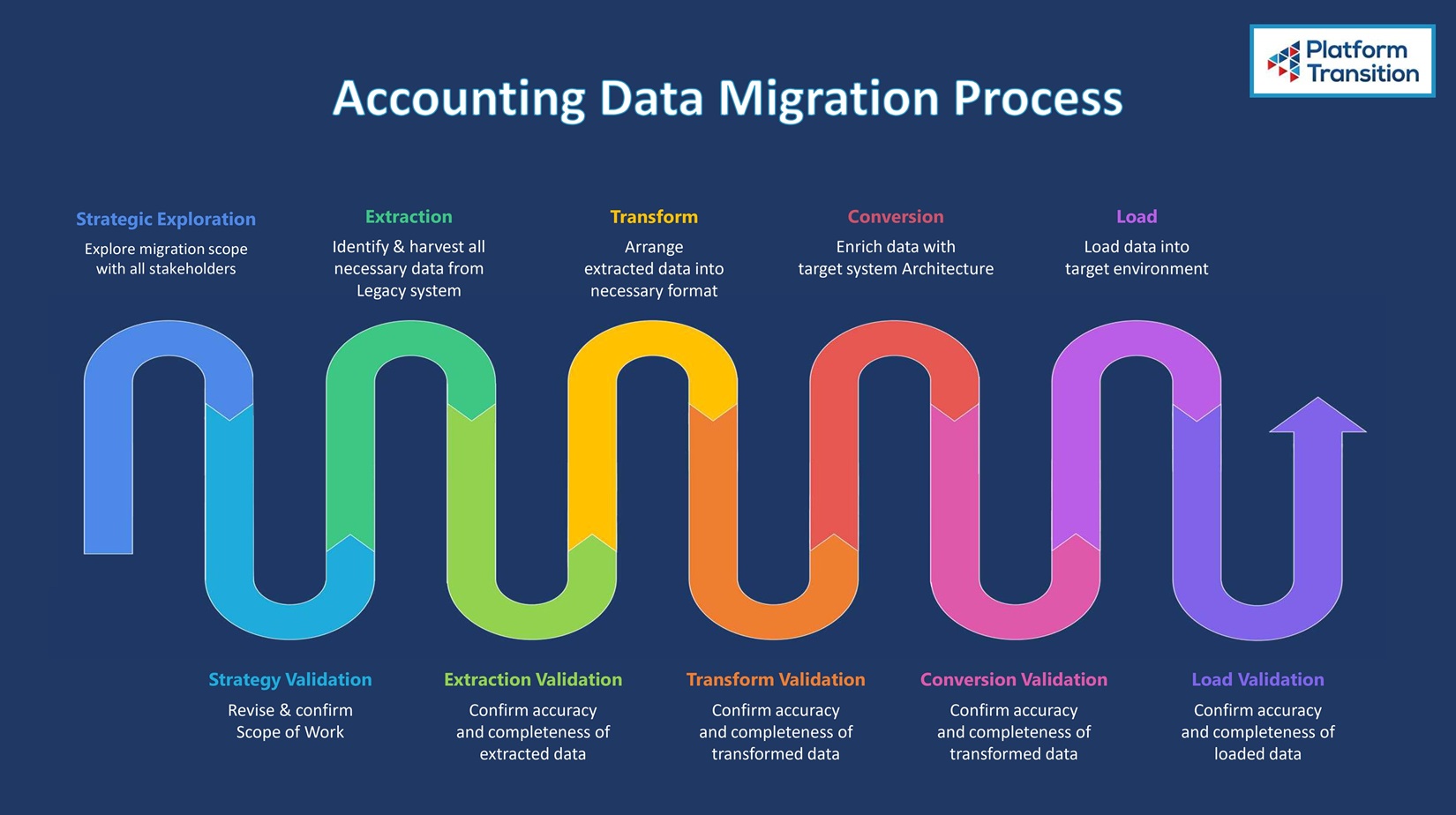
1. Strategic Exploration
Our data migration process starts before we sign an agreement with you. During our Strategic Exploration, we ask probing questions to make sure you’re migrating the right types of data at the level of detail that you need. If you just need your master data, general ledger transactions, and open accounts payable and receivable details, you’ll get everything you need from a detailed general ledger (GL) migration. But if you’re looking to tackle an audit or prepare for acquisition, and you require a detailed accounting of all of your subledger history — including historical bills, bill payments, historical invoices and their associated payment information — to be accurately migrated and mapped to the new system’s dimensions and hierarchies, you’ll need a subledger rebuild in addition to a GL detail migration.
This step frequently drives significant value for our clients by exposing false assumptions they’ve made about their implementation plan.
Here’s a scenario that we see happen often: A client wants to migrate from QuickBooks to Sage Intacct, and they assume that since Items are part of Invoices in QuickBooks, they will have access to Items in Sage Intacct as long as their implementation scope includes Accounts Receivable. However, though Items can be referenced on Accounts Receivable Invoices, they don’t drive the general ledger account selection, like they do when generating an invoice in QuickBooks. This difference can lead clients to realize they need to expand their implementation scope to include configuring the Order Entry and Purchasing modules, which may not be in their initial plan. Discovering this when there’s still time to adjust their implementation scope saves a lot of heartache compared to realizing it post-implementation.
During this step, we also make sure that the right people are weighing in on your migration plan to ensure that it meets the needs of the people who will actually use the system daily. This includes representatives from your IT team, your accounting and finance teams, and, if you’re a construction company, your project managers.
2. Strategy Validation
In the second step of our process, we present the Scope of Work we’ve prepared based on our findings during step one. We revise the scope as needed to get sign-off from all stakeholders to make sure your migration will serve all your end-users.
3. Extraction
A perfect data migration starts with identifying and harvesting all of the necessary data from the legacy system.
We work with you to extract all of your relevant raw data. Regarding your master lists, we make sure to extract all of your data, instead of just your active lists. By including both active and inactive master data, we prevent errors arising from migrating data you haven’t properly mapped or accounted for (like transactions with vendors you haven’t used in five years but who still exist in your system).
4. Extraction Validation
In the fourth step of our process, we make sure that both teams agree that the data we’ve extracted is correct, according to a validation standard that we all agree on, such as an AP Aging Detail report.
Now, you may be wondering, how could the data not be correct? All we’ve done is extract it from the system. We haven’t modified it in any way. However, we know from experience that it’s possible for an AP Aging Detail report produced inside your legacy system to deviate from an AP Detailed Transaction report from the same system due to possible database corruption within your legacy system that you don’t even know about.
If we skipped this step (which most ETL vendors do), the new reports generated in Sage Intacct might never match the reports in the legacy system no matter how technically perfect the migration is.
Additionally, this step establishes a validation standard that we will use throughout the rest of the process, giving you complete confidence in the completeness and accuracy of the data at every step of the migration.
5. Transform
Next, we prepare the extracted data for the import into Sage Intacct. During the Transform step, we take the raw data from the legacy system and reformat it to fit into Sage Intacct’s import templates — be they CSV files or formats to support an API upload.
This can include rearranging columns, shortening names, or re-sorting transactions to meet Sage Intacct’s requirements. The goal is to transform the extracted data into a clean, consistent CSV file or API call that can be seamlessly loaded into the target system.
By keeping the Transform step focused solely on reformatting the data, without performing any conversions on the actual information, we avoid introducing potential errors or instability into the migration process and maximize the ability to internally audit the process.
6. Transform Validation
Data migrations tend to involve tens of thousands of rows of data — or even millions in some cases. If proper precautions aren’t followed, data can get lost during the Transform step.
Let’s imagine a column containing important data gets left behind from the old spreadsheet, or the last 10 rows in a 125,000-line spreadsheet don’t get copied to the new spreadsheet. Mistakes like these will destabilize your entire migration if they’re not caught and corrected before moving onto the data conversion step.
Because of the many challenges of working with data at scale during the Transform step, we spend extra time validating everything we did in the previous step, once again using the same validation report we established in step four.
7. Conversion
When migrating accounting data from a legacy system to Sage Intacct, you have the opportunity to enhance that data with the new standard and user-defined dimensions available in Sage Intacct (up to 28!). Dimensions in Sage Intacct are essentially tags that allow you to categorize and track financial and operational data without cluttering your chart of accounts. By dimensionalizing your historical data, we make it behave as if it was originally entered in Sage Intacct — with all of the new dimensions (chart of accounts, vendors, customers, employees, departments, classes, etc.) and proper relationships in place.
This step is particularly important for construction companies because of the need to account for quasi-master data like project cost codes and cost types. These quasi-master data elements need to be set up at the master level before they can be used in a particular project’s transaction data.
Preserving these quasi-master data relationships accurately is critical during the data conversion process. Simply extracting the cost codes and types isn’t enough — the migration has to ensure the proper hierarchy and linkages between the project, cost codes, and cost types are maintained when moving the data to the new system. Failing to account for this unique data structure can lead to errors and incomplete reporting in the target system.
8. Conversion Validation
In the Conversion Validation step, we run reports based on the converted data and compare the results to the same reports in the legacy system. We ensure the converted data will function the same way in Sage Intacct as it did in the legacy environment, before the data gets loaded to a Sage Intacct environment. We perform these validations in an environment completely outside of Sage Intacct, so if there are any errors, we can fix them before we load any data into Sage Intacct.
9. Load
During this step, we execute on the Implementation plan for the level that each type of data should be entered into Sage Intacct. There are four options, and the wrong choice can break your configuration:
- Master Data and Transactional Data at the Top Level
- Master Data at the Top and Transactional Data at the Entity Level
- Master Data and Transactional Data at the Entity Level
- A mix of all three
For example, you might think that you want a particular vendor entered at the entity level, because you think that Entity A is the only one that uses that vendor. But later, you realize another entity uses the same vendor. Since you entered that vendor at the entity level, you have to create a duplicate vendor for Entity B, or else restart the whole process. But having duplicate vendor entries can cause confusion later on, making it difficult to evaluate your spending with that particular vendor across all entities.
Once again, we draw on our experience to help you confirm the right choice based on the plan made between you and your implementation specialist. Then, we load your data into the implementation environment at the appropriate levels.
10. Load Validation
While the data is still in the implementation environment, we perform a first-pass validation to make sure everything we expected to see from the post-conversion validation (which happened outside of Sage Intacct) matches everything in the target system.
Once you’ve confirmed that everything is perfect in the implementation environment, then — and only then — we move your data into the production environment.
During that final step, there is still an opportunity for clerical errors, so after we load the data, we check it one more time to confirm that everything in the production environment matches exactly what you saw in the implementation environment, down to the penny.
And at that point, you’re free to leave your legacy system behind.
Accounting Data Migration FAQs
When should you start planning for data migration?
As early as possible. There’s tremendous value in planning your migration before designing your go-forward architecture, because the data migration planning process can inform the implementation plan and identify false assumptions you’re making about the implementation before they cause problems. Also, we don’t need the target system to be set up to begin extraction, so you truly can’t start too early.
Do we need to back up our legacy data before migrating it?
In most cases, a backup isn’t necessary, because unlike a phone data migration, you’ll typically still have access to the legacy system and all your data in it after you complete your migration. The only case where a backup is still a good idea is if you’re doing a migration from QuickBooks Desktop to QuickBooks Online. They have an automated migration system, but if the automated transfer fails, it could corrupt your existing database, so it’s good to make a backup before beginning the transfer.
How long does an accounting data migration take?
If you were to attempt to migrate your accounting data on your own, it could take hundreds of hours. When you hire Platform Transition, we not only migrate more data in less time, but we also take away the time pressure associated with go-live by migrating everything you need to be functional on day one without compromising your ability to migrate more detailed transactional data after the go-live. With this approach, we can migrate all of your already reconciled data in a matter of days to meet your go-live deadline, and then we can bring over the rest of the data (the data that was either unreconciled or didn’t exist yet when we did the reconciled data migration) as soon as your close your books on the period between the first migration and your go-live date (which is the point at which you stop creating new data in the legacy system).
Migrate Your Data with Confidence
If you lose confidence in your data or the process with which it is being migrated, that data becomes less useful to you. That’s why we have designed our 10-step process to give every stakeholder complete confidence about the quality, accuracy, and completeness of the data migration at every single step of the process.
Using this 10-step process, we have performed more than 2,700 migrations to Sage Intacct with years of historical data — even from complex multi-entity accounting systems.
With our flat-fee model and commitment to getting it done right the first time, you can have total confidence in your data migration. Ready to experience a seamless transition to Sage Intacct? Schedule your Strategic Exploration call or request a quote today to get started.