


How Sage Intacct Dimensions Transform Financial Reporting and Analysis
By Hugh O. Stewart
One of the biggest differences between a legacy accounting system like QuickBooks and a dimensional accounting platform like Sage Intacct comes down to where the structure for categorizing and tracking each transaction lives:
- In many legacy systems, most of that structure lives at the account level, embedded in the general ledger (GL) code.
- Sage Intacct puts the structure on the transaction itself using dimensions.
In legacy accounting systems like Great Plains, you have to hard-code any business segments you want to be able to report on into the account structure. For example, account 110-120-6200 could represent:
6200 = Expense type (Rent)
120 = Department (Graphics)
110 = Location (Downtown)
If you see a $4,500 transaction in account 110-120-6100, you can conclude that the transaction represents an expense for Rent for the Graphics Department in the Downtown location.
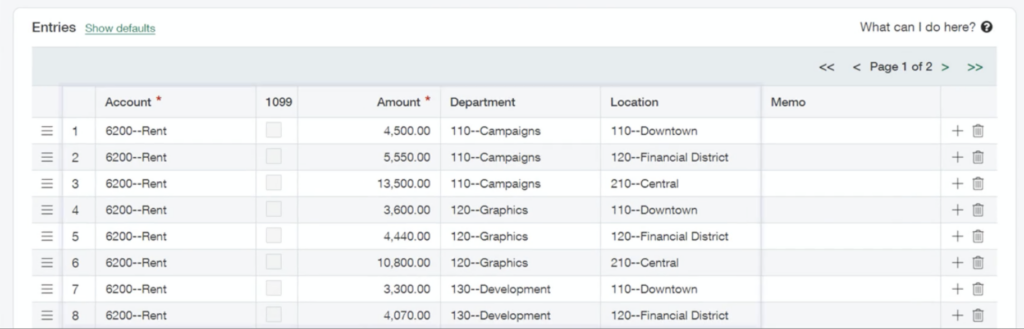
In a dimensional accounting system, you attach the context that explains each transaction to the transactions themselves using dimensions. This lets you dramatically simplify your chart of accounts because you no longer need a separate account for every combination of dimensions you want to be able to report on.
Inside of account 6200, which represents Rent, you can tag transactions with any of your pre-determined dimensions, like department and location.
The Standard Dimensions in Sage Intacct
In addition to general ledger accounts, Sage Intacct offers seven standard dimensions, which can all be renamed to match your business terminology and, in many cases can be repurposed to meet your specific business needs:
- Department: The internal function responsible for the transaction, such as Sales, Marketing, Field Operations, or Finance.
- Location/Entity: The geographic office or operating unit where the transaction occurred, such as Chicago Office, Atlanta Branch, or West Region.
- Customer: The external organization receiving your goods or services in that transaction, such as ABC Development, City of Madison, or General Contractor XYZ.
- Vendor: The supplier you purchased goods or services from during that transaction, such as ABC Concrete, United Rentals, or Office Depot.
- Employee: The internal staff member associated with the transaction.
- Item: The specific product or service sold or purchased in that transaction, such as ready-mix concrete, excavator rental, or annual software subscription.
- Class: A flexible category for tracking anything meaningful for your organization, such as Billable vs. Non-Billable costs or Distribution method (direct versus reseller).
Some of these dimensions look similar to fields that are available in QuickBooks or other legacy systems, but there are key differences.
In Sage Intacct, dimensions are flexible attributes that can be applied independently to any transaction line, while in QuickBooks many fields are mutually exclusive or structurally linked. For example, Sage Intacct allows a transaction to include a customer, vendor, project, department, and location simultaneously, whereas QuickBooks often forces you to choose between customer- or vendor-based transactions. Sage Intacct dimensions are also independent of each other, so a project can change customers without changing the project itself. In QuickBooks, projects are tied to customers, which means if a project changes ownership, you often have to create a new project to reflect the new customer relationship.
Beyond these standard dimensions, Sage Intacct also offers additional dimensions with its industry-specific subscriptions. Some of the most popular ones include:
- Project (with subscription to Project applications)
- Cost type (dependent on Project and Task dimensions and subscription to Construction)
- Task (dependent on Project dimension and subscription to Projects)
- Contract (with subscription to Contracts)
- Affiliate entity (with multi-entity environment and subscription to Consolidation)
- Asset (with subscription Fixed Assets Management)
- Warehouse (with subscription to Inventory)
And if you need even more dimensions, you can add up to twenty user-defined dimensions. However, many teams cover all of the reporting categories they’re interested in with the standard dimensions.
The Benefits of Dimensional Accounting
Dimensional accounting overcomes many of the challenges legacy systems struggle with, such as adding new business units, accurately recording inter-entity transactions, and entering data efficiently.
Add New Business Units Without Exploding Your Chart of Accounts
Dimensional accounting systems are more scalable than traditional accounting systems.
With traditional accounting software, where the department and business unit are embedded in the account code, adding a single business unit might mean adding thousands of accounts.
With dimensional accounting, you can create a new business unit as a new value within the Location/Entity dimension, and that business unit tag can be added to all transactions going forward. That gives you the ability to report on combinations of department (e.g. marketing), business unit (e.g. e-commerce sales), and account (e.g. accounts payable) — as well as customer, vendor, employee, item, and class — all with the addition of one dimension value, instead of hundreds or thousands of account combinations.
Dimension groups give you the ability to run even more granular reports without changing the underlying structure of your data.
You can select any number of values inside of a dimension and identify them as a group. For example, at Platform Transition, we use groups inside the Project dimension to group projects by scope, quarter, and year.
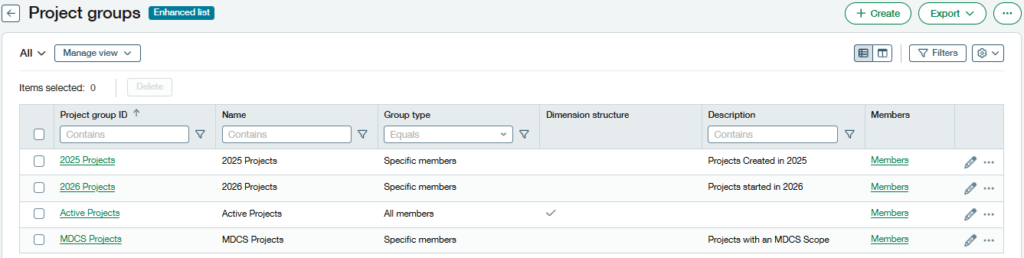
Saving projects into groups lets you report on only the projects you’re interested in, excluding everything else within that dimension, without hand-selecting those projects every time.
Accurately Track Inter-Entity Transactions without Spreadsheets
Dimensions make it possible to operate with a multi-entity structure and accurately track inter-entity transactions without relying on spreadsheets. In Sage Intacct, not only can you tag transactions with any of the dimensions you’ve enabled, you can also tag each line of that transaction with unique dimensions. This is huge for inter-entity transactions, because Sage Intacct’s dimensions also come with allocations — the ability to distribute value across dimensions within a transaction.
Let’s say you have a bill from a single vendor that needs to be allocated across three of your business units.
Without dimensions, you would typically have to:
- Enter the full vendor bill in one entity
- Create manual intercompany journal entries
- Reallocate costs across entities
- Reconcile intercompany balances
In Intacct, you can automatically settle the allocations and intercompany accounting by adding the appropriate dimensions to each line of the transaction.
Standardize and Streamline Data Entry
When properly configured, Sage Intacct can streamline and standardize data entry by using dimension relationships and restrictions.
Dimension members can have parent-child hierarchies. Many teams take advantage of this with the Location dimension. For example, you can set up California as a parent, with Northern California and Southern California as children. Northern and Southern California could each have additional child locations. You’ll be able to generate reports for any of the child or parent accounts.
Dimensions can also be set up with restrictions that require certain dimensions to be added to all transactions within certain accounts. A common restriction our customers choose is that all transactions in the Accounts Payable account must have a vendor dimension. That way, you never end up having to dig through your email to find an invoice that matches an uncategorized AP transaction.
In Sage Intacct, dimensions can be configured with rules and defaults so that selecting one dimension value automatically fills in others, which reduces manual data entry and helps ensure transactions are coded consistently.
For example, consider a grant-funded nonprofit that operates multiple programs. Suppose the organization has a project called “Drop-In Center” that always takes place at the Downtown location and is funded through grants, meaning the related expenses are billable.
The accounting team could configure the system so that when a user selects Drop-In Center in the Project dimension, the system automatically populates the Class dimension with the value “Billable” and the Location dimension with the value “Downtown.”
How to Prepare for a Migration to a Dimensional Accounting System
Planning an implementation of Sage Intacct isn’t that different from planning an implementation of QuickBooks or another legacy system in terms of the questions you need to ask yourself.
Whether you are designing a chart of accounts in QuickBooks or defining dimensions in Sage Intacct, you need to create a reporting wishlist. The core questions are the same:
- What parts of the business need separate financial visibility?
- How do leadership teams want to compare performance?
- What kinds of reports will different stakeholders rely on?
The difference between a dimensional accounting system and a legacy system is that legacy systems force you to make feasibility tradeoffs, while dimensional systems largely remove those constraints.
This is where many accounting teams run into trouble, because they find it hard to imagine new ways of reporting.
To make sure you get the full value from Sage Intacct, think about what information you’d like to see instantly on a dashboard every day, and how that information would affect your decisions.
Ask yourself which attributes of your business you want to be able to track financially:
- Which departments generate costs or revenue?
- Which locations should be tracked separately?
- Do we need to analyze activity by project, program, or product line?
- Do we want dashboards showing performance by employee or customer type?
Dimensional accounting makes it possible to track information that was previously invisible — or only possible through excessive manual effort. For example, one of our accounting data migration customers had never been able to track marketing spending because their legacy system couldn’t separate those expenses from other departmental costs. Once they implemented dimensional accounting, they could finally monitor marketing investment across locations and programs without changing their chart of accounts.
Be as future-focused as possible when designing dimensions. While it’s easy to add new members within an existing dimension, it’s difficult to repurpose a dimension once it’s in use. Many re-implementations happen because the original structure didn’t anticipate growth or organizational change. Taking the time to design dimensions around how you want to analyze the business now and in the foreseeable future can prevent that problem.
Unlock the Full Value of Dimensional Reporting with Your Historical Data
Designing a thoughtful dimensional architecture in Sage Intacct gives your organization the ability to analyze the business in ways that were never possible in legacy systems like QuickBooks. But those powerful reporting capabilities are most valuable when you can apply them to more than just the transactions recorded after go-live.
Many organizations migrate only a summary trial balance from their legacy system. While that approach may speed up implementation, it leaves years of historical transactions locked in the old system. As a result, the dashboards and reports are only able to reflect activity going forward.
Platform Transition helps organizations avoid that problem. Our data migration solutions move detailed historical transactions from your legacy accounting system into Sage Intacct so that your new dimensional reporting framework can be applied to the financial data you already have.
Instead of starting from a blank slate, you gain the ability to analyze historical performance across the same dimensions you designed for the future. That means you can immediately answer questions like how individual projects or business units have performed over time.
After investing the effort to design a dimensional reporting structure that truly reflects your business, it would be a shame to leave your historical data behind.
Learn how Platform Transition’s data migration services can help you bring your historical financial data into Sage Intacct and unlock the full value of your dimensional reporting strategy. Schedule a meeting or request a quote to start planning your move to dimensional accounting software today.